
WBN News Corp Inc.™
LinkCast™
Connecting communities through resources. Discover, submit, review and publish trusted local resources for Delta and WBN test markets.
LinkCast™ v0.1 · WBN Cast OS™ v1.0
LinkCast™: Dynamic categories · Link resource listings · Candidate queue · Paper workflow · Academy · Revenue Engine
LinkCast
Browse all published link resources — services, organizations, businesses, programs, opportunities, savings and community information.
Browse By Category
Select a category to filter LinkCast™ resources.
Featured
Hand-picked community resources from the LinkCast team.
Resources
Downloadable resources and links from the WBN community.
Submit A Link
Submit a useful community resource link for LinkCast™ review.
About LinkCast™ Submissions
LinkCast™ is built to help residents find useful community resources, services, businesses, savings, organizations, and public information in one trusted place. Submit a link that may help people in this community.
How it works: your submission is reviewed before it becomes a public listing. Only Resource / Link Name and Website URL are required — everything else is optional. The more detail you provide, the faster it gets reviewed and the better the listing will be.
Required Information
Only these two fields are required to submit.
Community Resource Details
All optional — providing these helps us build a better listing faster.
Submitter Information
All optional — helps us follow up if we have questions about your submission.
Review Tip
The more complete your submission, the faster it can be reviewed and the greater the likelihood it will be approved as a LinkCast™ resource listing.
About LinkCast™
Every link. Every service. Every community.
What Is LinkCast™?
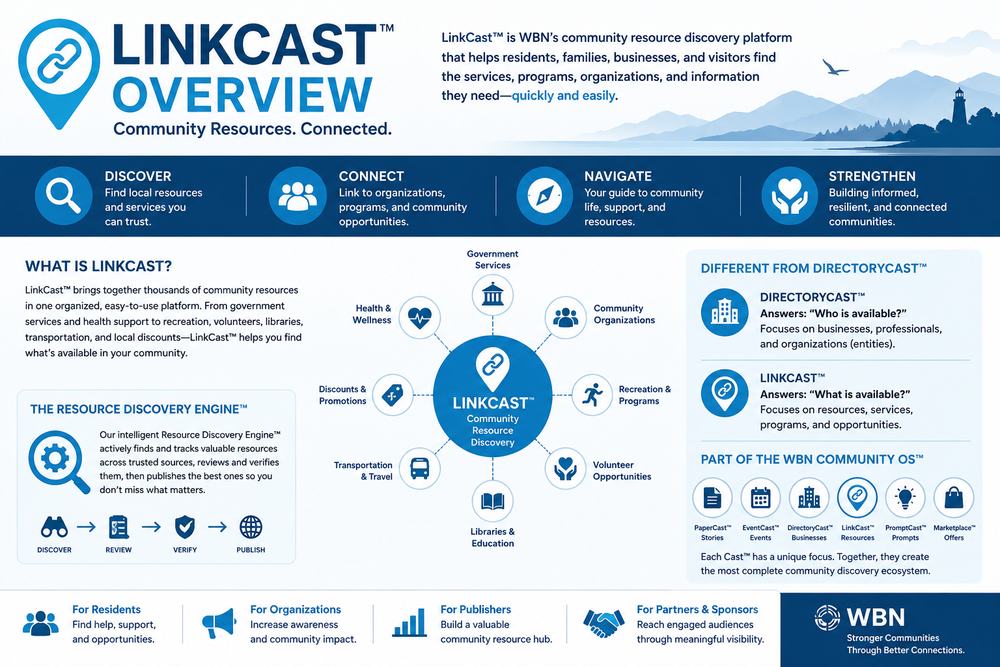
LinkCast™ is a community-powered link resource platform where residents can find trusted services, businesses, organizations, savings, emergency resources, government links, community programs, and opportunities in one searchable place.
How It Works
The directory is built from public submissions, source gathering, and editorial review before publication. Our goal is simple: help people find the right link or service quickly.
Who It Helps
LinkCast™ is designed for residents, families, seniors, students, newcomers, nonprofits, community groups, publishers, tourists, and small business owners looking for trusted local resources in one place.
Submit A Link, Business, Resource, Or Service For Review
LinkCast™ accepts submissions for links, services, businesses, resources, community programs, savings, organizations and opportunities that may provide value to businesses, citizens, entrepreneurs, publishers, community builders, and professionals.
Every submission is reviewed before publication. Submitting a listing does not guarantee approval. The more complete the submission, the faster it can be reviewed and the greater the likelihood it may be considered for inclusion in LinkCast™.
LinkCast™ focuses on quality, usefulness, trust, and community value.
Community Resource Ecosystem™
LinkCast™ is more than a directory. It is a Community Resource Ecosystem™ — a living, curated platform that grows through community contributions and editorial care, connecting people with trusted solutions that help them learn, create, save, and grow.
Built By The Community. Curated For The Community.
Submit a listing. Share a guide. Help someone find what they need.
LinkCast Listing
👁 Preview Mode
Get the LinkCast™ Community Resource Update
Sign up to discover useful links, local services, community resources, savings and special offers. Then you will be taken straight to your guide.
Admin Login
Enter the directory admin password.
LinkCast Admin
LinkCast™ v0.1.2 · Admin Discovery Queue & Community Architecture Build™ · WBN Cast OS™ v1.0 · Manage resources, discovery queue, candidates, sources, sponsors and cloud data.
Daily Dashboard: quick view of directory health, tracking, new candidates, featured listings, revenue partners and guide activity.
☁️ Cloud Sync Diagnostics
Loading diagnostics…
Fix for public visitors: if "PUBLIC_BIN_ID (file)" shows ✗ EMPTY above, go to Admin → Data → Cloud Sync Engine™ → Generate CONFIG Block → copy → paste into the HTML file replacing the old
var CONFIG = {…}; block → re-upload to Ghost. That embeds credentials so every visitor auto-fetches on page load.
New Candidates
Loading…
Featured Resources
Loading…
Top Resources By Clicks
Loading…
Revenue Partners
Loading…
Quick Actions
Resources: manage downloadable resources and links shown on the public Resources tab. Set lead capture required to send visitors to the Ghost newsletter signup before the guide link.
Add Link / Resource
Academy: the official LinkCast™ operational and training manual for publishers, editors, administrators, and community builders. Scroll through the full manual below or jump to any section using the Table of Contents.
Academy Team Notes
Use this area for internal workflow reminders, review standards, team updates, and onboarding notes. The full Academy Manual is below.
📖 LinkCast™ Academy Manual
VERSION 1.0 · OFFICIAL OPERATIONAL & TRAINING REFERENCE
WBN News Corp Inc.™
LinkCast™
Academy Manual
Academy Manual
Official Operational & Training Reference
Version 1.0
June 2026
18 Sections
Built By The Community. Curated For The Community.
LinkCast™ Academy Manual
v1.0 · June 2026
Table of Contents
01Welcome To LinkCast™
02Understanding The LinkCast Workflow
03LinkCast Philosophy
04Daily Dashboard
05Academy
06Candidates
07Submission Intelligence
08Editorial
09Categories
10Collections™
11Resources
12Revenue Engine™
13Tracking & LinkCast Intelligence
14Partnership Strategy
15Data Management
16LinkCast Standards
17LinkCast™ Roadmap
18The Long-Term Vision
Section 01
Welcome To LinkCast™
Purpose
LinkCast™ exists to help people find things that work.
Not products. Not software. Not advertisements dressed up as recommendations. Things that work.
The platform serves businesses, citizens, entrepreneurs, publishers, community organizations, students, seniors, nonprofits, and professionals who are looking for trusted links, resources, services, opportunities, and solutions to real problems in their lives and work.
Every listing in LinkCast™ has been submitted by a community member and reviewed by an editor before it goes public. That review process is what separates LinkCast™ from every other directory, link list, or AI-generated resource database on the internet.
Trust is not a feature. Trust is the product.
Mission
To build the most useful, honest, and community-driven discovery platform available — one that helps people solve real problems, find trusted resources, and grow their capabilities without wading through noise, paid placements, or low-quality recommendations.
Vision
LinkCast™ is intended to become the go-to resource hub for WBN publishers, readers, and community members — a living, growing platform that reflects the real needs, real experiences, and real recommendations of the people it serves.
Over time, the directory will expand from a listings platform into a full discovery ecosystem: guiding, educating, connecting, and empowering people at every stage of their journey.
How LinkCast™ Differs From Traditional Directories
Traditional directories accept listings automatically or for a fee. Quality is not evaluated. Spam is common. Outdated listings accumulate. Users learn quickly that the listings cannot be trusted and stop using the platform.
LinkCast™ works differently. Every submission enters a Candidate Queue. An editor reviews it. The submission is assessed for quality, relevance, trustworthiness, and community value. Only approved submissions become published resources. Listings that do not meet the standard are declined, archived, or returned for improvement.
Why slower growth is intentional
This means the directory grows more slowly than an automated directory. That is intentional. A smaller, trusted directory is worth far more than a large, unreliable one.
The Role of Editorial Review
Editors are the guardians of the directory. Their job is not to decide whether a resource is popular or well-marketed. Their job is to decide whether a listing belongs in the LinkCast™ — whether it is useful, honest, trustworthy, and relevant to the people WBN serves.
Editorial review is not gatekeeping for its own sake. It is a service to every person who will eventually use the directory.
Why Trust Matters
Every platform that sacrifices trust for volume eventually collapses. Users stop returning. Publishers lose confidence. Partners pull back. The platform becomes noise.
LinkCast™ is built on the opposite principle. Every decision — about listings, categories, guides, partnerships, and design — is made in service of trust. That trust is built slowly and protected carefully.
When a community member opens the LinkCast™, they should feel confident that what they find there has been looked at, considered, and approved by people who care about quality. That confidence is the foundation of everything the platform will become.
Section 02
Understanding The LinkCast Workflow
LinkCast™ follows a clear, documented workflow from public submission to published listing. Understanding this workflow is essential for every administrator, editor, and publisher who works with the platform.
The Workflow
Submit
→
Candidate Queue
→
Review
→
Approve
→
Link Resource Creation
→
Publish
→
Resource Guide Creation
→
Review Article
→
Partnership Opportunity
Each stage has a specific purpose.
- Submit. A community member, resource owner, partner, or contributor fills out the public Submit A Link form. They provide the resource name, website URL, their name and contact details, their relationship to the resource, a suggested category, and — most importantly — why they believe LinkCast™ should consider it. This submission creates a Candidate record.
- Candidate Queue. The submission lands in the admin Candidate Queue. It receives an auto-generated Candidate ID (MP-0001, MP-0002, and so on) and a timestamp. Administrators can see all submissions, sorted by date, with full submission intelligence preserved.
- Review. An editor reviews the candidate. They assess the tool, visit the website, read the submission intelligence, and make a judgment about whether the listing belongs in the directory.
- Approve. If the listing meets the standard, the editor clicks Create Link Resource Listing. A new editorial record is created, pre-filled with the submission data, ready for the editor to refine and complete.
- Link Resource Creation. The editor fills in or completes the listing fields: name, category, summary, about section, business use case, community use case, ratings, and all relevant links.
- Publish. The editor sets the listing status to Published or Featured and saves. The listing goes live on the public directory immediately.
- Resource Guide Creation. Over time, popular or important listings may inspire Resources — connected back to the listing to create a discovery network.
- Review Article. Significant listings may also generate a WBN review article — a full editorial piece published on the WBN platform.
- Partnership Opportunity. Listings that perform well, generate meaningful traffic, or represent strategic categories may eventually lead to partnership conversations tracked in the Revenue Engine™.
Why Listings Are Reviewed Before Publication
A submitted listing is not a published listing. The difference matters. Submitted listings are invisible to the public. They live only in the Candidate Queue. They represent interest, not endorsement. The review process is what transforms a submission into a recommendation.
This is not bureaucratic delay. It is the process by which the directory earns and keeps the trust of its users.
Section 03
LinkCast Philosophy
Most LinkCasts Organize Products
A typical software directory organizes tools by category — email, CRM, project management, design. Users browse categories to find tools. The directory itself offers no judgment about whether the resource is good or relevant to that particular user.
The model works well enough for users who already know what they are looking for. It works poorly for users who have a problem to solve but do not yet know what kind of resource might help.
LinkCast™ Organizes Solutions
LinkCast™ is built around a different idea: people do not search for tools. They search for outcomes.
- A small business owner is not looking for a CRM. They are looking for a way to stay in touch with customers and grow their business.
- A senior is not looking for a video calling application. They are looking for a way to stay connected with family.
- A community organizer is not looking for a newsletter platform. They are looking for a way to reach and grow their audience.
The difference matters enormously when it comes to how listings are written, how categories are organized, how guides are created, and how the platform is ultimately used.
Solutions, Not Products
LinkCast™ thinks in terms of outcomes:
- Save Money — links and resources that help families, seniors, and small businesses reduce costs and find better deals
- Grow A Business — platforms, services, and strategies that support entrepreneurs and small business owners
- Start A Newsletter — publishing resources, services, and guides for community builders and content creators
- Build A Community — social platforms, community tools, and resources for people who want to connect and grow
- Learn New Skills — training resources, guides, and educational platforms for personal and professional development
Every listing in the directory is ultimately a vehicle for one of these outcomes. Every word in every listing should answer the user's real question: "How does this help me?"
The Editorial Mindset
LinkCast editors are not librarians cataloguing titles. They are advisors helping people make decisions.
Write every summary as if you are explaining the listing to a trusted friend who has a specific problem. Be honest about what the resource does and who it is for. Do not oversell. Do not undersell. Tell the truth clearly.
Section 04
Daily Dashboard
Overview
The Daily Dashboard is the first thing an administrator sees when they log in to the LinkCast™ admin area. It provides a snapshot of platform health, pending work, and key activity.
The dashboard displays: total listings, categories, candidates awaiting review, featured listings, published guides, and active revenue partners. Below the stats, it surfaces new candidates, featured listings, top-performing listings by clicks, and active revenue partners. Quick action buttons provide one-click navigation to all key admin areas.
Daily Review Process
A healthy directory requires consistent attention. The recommended daily routine for administrators:
- Morning check. Review the Daily Dashboard. Note any new candidates. Check if any featured listings need refreshing. Review the top listings by clicks — a listing gaining unusual traffic may represent a publishing or partnership opportunity.
- Candidate review. Open the Candidates tab and work through any new submissions. Set statuses, add internal notes, and advance good submissions toward listing creation. Reject or archive submissions that do not meet the standard.
- Listing management. Review listings for completeness. Listings missing summaries, use cases, or links are not serving users well. Improve them when time allows.
- Guide and content review. Check if any listings would benefit from a guide, review article, or additional coverage.
Best Practices for Administrators
- Keep the candidate queue clean. A backlogged queue slows the directory and discourages future submissions.
- Use internal notes generously. Notes help other administrators understand the history of a submission and avoid duplicated work.
- Update listing statuses accurately. A listing marked Published but missing key fields creates a poor experience for users.
- Featured listings should earn their status. Review featured listings regularly and update them based on performance, relevance, and freshness.
Section 05
Academy
What The Academy Is
The Academy section of LinkCast™ admin is the institutional knowledge base of the platform. It is where training notes, operating procedures, review standards, editorial guidelines, and institutional memory are stored. The Academy is not visible to the public.
Why The Academy Matters
Platforms fail when knowledge lives only in people's heads. When a key administrator leaves, a process changes, or a new editor joins the team, institutional memory becomes critical.
Every significant decision about the directory — about review standards, category structures, editorial tone, partnership criteria — should be recorded in the Academy. Future administrators will thank you.
What To Document
- Review standards — what criteria are used to evaluate submissions
- Editorial tone — how listings should be written, what language to use, what to avoid
- Category decisions — why certain categories were created, merged, or retired
- Partnership criteria — what makes a partner relationship appropriate for the directory
- Workflow changes — when and why operating procedures were updated
- Lessons learned — what worked, what did not, and what to do differently
Best Practices
Write Academy notes as if explaining the platform to someone who has never seen it. Be specific. Include examples. Date your entries so future administrators can understand the context in which decisions were made. Review and update the Academy quarterly, or whenever significant changes are made to the platform.
Section 06
Candidates
What Candidates Are
A candidate is any submission that has been received but not yet approved for publication. Candidates live in the Candidate Queue inside the admin area. They are invisible to the public. Every submission from the public Submit A Link form becomes a candidate automatically.
Candidate IDs
Every candidate receives a unique Candidate ID at the time of submission, in the format MP-0001, MP-0002, MP-0003, and so on. These IDs are permanent and sequential.
Candidate IDs allow administrators to reference specific submissions in internal conversations without confusion, create a historical record of the volume and order of submissions, and survive the full lifecycle of the record — from submission through review, listing creation, and publication. When a candidate is promoted to a published listing, the Candidate ID is preserved in the listing record.
Candidate Statuses
| Status | Meaning | Next Step |
|---|---|---|
| Submitted | Received, awaiting review. No action taken yet. | Editor opens and begins review |
| Under Review | An editor is actively evaluating the submission. | Approve or Reject |
| Rejected | Does not meet the standard. Record retained for reference. | Archive or revisit later |
| Published | Approved. A link resource listing has been created from it. | Original candidate record retained |
Candidate Review Workflow
- Read the full submission intelligence — particularly the submitter's explanation of why LinkCast™ should consider the resource.
- Visit the website provided and spend at least a few minutes understanding what the resource does.
- Consider whether the resource genuinely serves the communities WBN exists to help — families, seniors, students, nonprofits, community groups, publishers, and small business owners.
- Add internal review notes documenting observations, concerns, or follow-up items.
- Update the candidate status to reflect the current stage of review.
- If the candidate is approved, use Create Link Resource Listing to advance it to the editorial stage.
Evaluating Candidates — Four Questions
- Quality. Is the resource well-built? Does the website function correctly? Are there obvious signs of low quality, spam, or deceptive practices?
- Relevance. Does the resource serve the communities LinkCast™ exists to help? Is it genuinely useful for families, seniors, students, nonprofits, community groups, or small businesses?
- Trustworthiness. Can the resource be recommended with confidence? Is the company or creator credible? Are there privacy or security concerns that should give the editor pause?
- Community value. Does the resource represent genuine community value — something that helps people solve a real problem, save time, learn something, or connect with others?
Decision rule
If the answer to all four questions is yes, the candidate should be approved. If significant concerns exist on any dimension, document them in the internal notes and consider carefully whether and how to proceed.
Section 07
Submission Intelligence
What Submission Intelligence Is
Submission intelligence is the information a submitter provides beyond the basic details of what the resource is and where to find it. The most important pieces are:
- Why should LinkCast™ consider this tool? — the submitter's own explanation of the tool's value, use cases, community relevance, and why it belongs in the directory
- Have you personally used this resource? — direct user experience, yes or no
- Relationship to tool — the submitter's relationship to what they are recommending (owner, employee, customer, community member, and so on)
This information is preserved throughout the entire lifecycle of the record. It does not disappear when a candidate is promoted to a listing.
Why Submission Intelligence Matters
The submitter's own words are often the most valuable editorial resource in the platform. The person who submitted a resource understands why they think it matters. They have a perspective the editor may not have. They may have personal experience, community context, or use case knowledge that transforms a generic listing into a genuinely useful resource.
Administrators and editors should read submission intelligence carefully — not to copy it verbatim into public listings, but to understand what makes the resource relevant and valuable, and to write listings that reflect that understanding.
How Submission Intelligence Creates Opportunities
| Opportunity | How Submission Intelligence Drives It |
|---|---|
| Listings | Phrases like "this saved our nonprofit $2,000 a year" or "my grandmother uses this every day" are the raw material for honest, useful listing summaries and use cases. |
| Review Articles | A detailed, passionate submission from a real user is the starting point for a WBN review article. The editor builds on the submitter's perspective with their own research. |
| Resources | Patterns in submission intelligence — multiple submissions in the same category sharing similar use cases — are a strong signal that a Free Guide is needed. |
| News Articles | Submission intelligence often contains news — a new resource changing an industry, a platform gaining rapid community adoption, a free resource nobody in the community knows about yet. |
| Partnerships | A submission from an owner or founder, combined with strong community interest in the tool, may represent a partnership opportunity to develop through the Revenue Engine™. |
The Relationship To Resource Field
The Relationship To Resource field tells the editor something important about the nature of the submission. An owner or founder has an obvious incentive to submit their own resource. That does not make the resource unworthy — but it does mean the editor should rely more heavily on independent research and less heavily on the submitter's own description.
A customer or community member with no commercial relationship to the resource is making a genuine recommendation. Their explanation of why the resource helped them is among the most valuable pieces of editorial intelligence in the platform.
The Personal Experience Field
A submitter who has personally used the resource can speak to the real user experience. Their submission intelligence is richer, more specific, and more credible. A submitter who has not personally used the resource may still be making a legitimate recommendation — but the editor should weight their submission intelligence accordingly.
Section 08
Editorial
Creating Listings
The Editorial tab is where link resource listings are created, edited, and managed. When a candidate is approved and promoted, the editorial form is pre-filled with data from the submission. The editor's job is to refine, complete, and publish the listing.
- Resource Name — the official name of the resource or service
- Category — the category the listing belongs to
- Resource Type — Government Service, Community Resource, Business, Non-Profit, School, Health Service, Volunteer Opportunity, Coupon / Deal, Online Resource
- Access / Cost Type — Free, Free / Low Cost, Paid, or Partner
- Short Summary — the public-facing summary shown on the directory card
- About This Resource — a fuller description of what the resource does and who it is for
- Business / Community Use Case — how the listing serves small businesses or community organizations
- URLs — partner program, review page, news article, direct website, training resource
- Ratings — Practical Value and Ease of Use (1–5 stars or Unrated)
- Best For — a plain-language description of who benefits most
- Tags — searchable keywords
Writing LinkCast Summaries
The Short Summary is the first thing a public user sees. It needs to communicate value immediately, in plain language, without jargon or marketing speak. A good summary answers three questions: what does this do, who is it for, and why does it matter?
Summary examples
Cloud-based CRM platform with advanced features and integrations.
A simple, free CRM for small businesses and nonprofits that helps you track customer relationships, follow up on leads, and stay organized — without hiring an IT team.
The first summary describes the product. The second summary serves the reader.
Business and Community Use Cases
The use case sections are among the most important fields in the listing. They translate the abstract capabilities of a resource into concrete, relevant scenarios.
Use case examples
Useful for small businesses.
A retail shop owner can use this to send weekly email updates to customers without paying for a dedicated email platform.
Good for nonprofits.
A neighborhood association can use this to manage their mailing list, send meeting reminders, and archive past communications — all for free.
Editorial Standards
- Summary written in plain language, free of jargon and marketing speak
- About section provides honest, accurate information about the tool
- At least one use case is documented, specific, and relevant to the WBN community
- Category is accurate and appropriate
- All provided URLs are valid and functional
- Cost type is accurate
- Listing has been reviewed by a human editor before publication
Section 09
Categories
Dynamic Categories
LinkCast™ uses a dynamic category system. Categories are built automatically from the categories assigned to listings. When a new listing is published with a category that does not yet exist, that category is created automatically. Administrators can also create categories manually for planned listing areas.
Category Management
Categories should be clear, specific, and useful to the people browsing the directory. A category is a navigation aid, not a label. It should help users find things, not classify them for internal purposes.
Category naming
Social Media Tools, Newsletter Platforms, Design Tools, Community Resources, Financial Tools
Miscellaneous, Other Tools, General Resources
Avoid creating categories for single listings. A category with one listing offers no discovery benefit and clutters the navigation.
Best Practices
- Review the category list periodically. Categories drift over time as listings are added, archived, and recategorized.
- Merge overlapping categories. Users benefit from fewer, clearer categories, not more.
- Create categories proactively for strategic listing areas. Creating the category before listings exist signals intent and aids planning.
- Err toward fewer categories with more listings in each rather than many categories with few listings in each.
Section 10
Collections™
What Collections™ Are
Collections™ are not categories. Categories organize listings by type. Collections™ organize solutions by outcome.
A category tells you what kind of thing you are looking at. A Collection™ tells you what problem you are trying to solve. A user browsing the Design Tools category is looking for design software. A user browsing the Small Business Starter Kit™ is looking for everything they need to launch and run a small business — across all categories, assembled with that specific goal in mind.
Collections™ are curated bundles of listings, guides, and resources organized around a specific, real-world outcome. They represent the most sophisticated form of discovery on the LinkCast™.
Collections™ Examples
Save Money Toolkit™
Tools, apps, and resources selected to help families and individuals reduce household costs, find better deals, manage budgets, and avoid unnecessary expenses.
Small Business Starter Kit™
Everything a new business owner needs in one place: CRM, invoicing, email newsletter, social media management, accounting basics, legal resources, and community support.
Community Resource Toolkit™
For neighborhood associations, nonprofits, faith organizations, and local groups looking to organize their community, communicate effectively, and grow their impact.
Publisher Toolkit™
The essential platform stack for independent publishers and newsletter operators: writing tools, email platforms, analytics, monetization resources, and community management tools.
Learning & Skills Toolkit™
A curated path for individuals developing new professional skills, digital literacy, or personal capabilities — including free and low-cost options at every level.
Why Collections™ Are Important
A category page says: "here are some tools in this area." A Collection™ says: "here is a complete solution for your specific situation." Collections™ reduce the cognitive load of discovery. Instead of browsing dozens of listings and assembling their own toolkit, a user can access a curated, tested, community-validated bundle designed for exactly their situation.
For the directory, Collections™ create deeper engagement, longer sessions, and stronger trust. They are also a significant partnership opportunity — a Collection™ named for a sponsor, built around their product ecosystem, represents a premium placement that benefits both the platform and the partner.
Roadmap note
Collections™ are a planned feature on the LinkCast™ roadmap. The foundation is being built now through quality listings, strong categories, and meaningful guides.
Section 11
Resources
What Guides Are
Resources are downloadable or linkable resources published through the LinkCast™ — plain-language guides, toolkits, checklists, and starting-point resources that help people take action with the tools and listings they discover on the platform. Guides are not marketing materials. They are genuine resources, written to help real people do real things.
Why Guides Matter
The gap between finding a resource and using a resource successfully is often wider than it appears. A guide bridges that gap. A listing for a newsletter platform tells a user what the platform is and who it is for. A guide called Getting Started With Your First Newsletter walks them through the process step by step — choosing a platform, building a subscriber list, writing their first issue, setting up a schedule.
Guides increase the actionability of the directory. They transform passive discovery into active engagement. They give users something to take away and use immediately.
Guide Examples
- Delta Resident Quick Links Guide — setting up a profile, finding your community, growing your first 500 followers
- How To Find Local Services Faster — a plain-English introduction to AI tools for everyday people
- Community Resource Toolkit — tools, templates, and workflows for neighborhood associations and nonprofits
- Local Savings Starter Guide — choosing the right platforms, setting up profiles, posting with purpose
- Free Design Tools For Nonprofits — the best free alternatives to expensive design software
- Start A Newsletter In A Weekend — choosing a platform, setting up your list, writing your first issue
Lead Capture and The Weekly Update
Some guides are offered with an optional lead capture step — users who want the guide are invited to sign up for the LinkCast™ Weekly Update before accessing the resource. This is always optional. Users can skip directly to the guide at any time.
The Weekly Update is configured through the Revenue Engine™ admin area. The signup URL, CTA title, description, and button text are all customizable.
Section 12
Revenue Engine™
What The Revenue Engine™ Is
The Revenue Engine™ is the commercial infrastructure of LinkCast™. It manages revenue partners, advertising relationships, featured placements, sponsored placements, and partnership campaigns. The Revenue Engine™ is an admin-only module — it is never visible to the public.
Beyond Advertising
The Revenue Engine™ is more than an advertising management system. It is a relationship management system.
Advertising is transactional — a company pays for a placement, the placement runs, the relationship ends. A partnership is relational — a company and WBN develop a shared audience, shared content, and shared goals over time. The Revenue Engine™ is designed to support both — the transactional placements that generate immediate revenue, and the strategic relationships that create long-term value.
Revenue Partners
Partners are tracked with full contact records — name, contact person, email, phone, website, partner type, and status. Partner types include Display Advertising, Featured Placement, Sponsored Placement, LinkCast Partner, Referral Program, Strategic Partner, Academy Sponsor, Resource Sponsor, and Other. Partner statuses — Prospect, Active, Paused, Archived — allow administrators to track the lifecycle of every relationship.
Partner Performance Reports
The Revenue Engine™ includes a report generator that produces performance reports for individual partners. These reports include listing views, clicks, CTR, and resource resource engagement — all presented clearly and ready to share. Reports can be copied as text or downloaded as CSV files, designed to be sent directly to revenue partners as evidence of performance and value.
The Weekly Update
The Weekly Update is the primary communication channel between the LinkCast™ and its community. It delivers new listings, free resources, community recommendations, and special offers directly to subscribers. It is the bridge between the platform and the audience — keeping users engaged, returning, and discovering new things.
Section 13
Tracking & LinkCast Intelligence
What Is Tracked
LinkCast™ tracks views and clicks for every listing and every guide. Views are counted once per page load per listing. Clicks are counted whenever a user interacts with a listing CTA — Review, News, Partner Program, Visit Resource, or Resource Guide Open. From these two numbers, the platform calculates Click-Through Rate (CTR) for every listing and guide.
All tracking is stored locally. No external libraries or analytics services are used. The tracking data is included in the platform's export and backup systems.
Why Data Matters
Tracking is not surveillance. It is intelligence.
- A listing with high views and low clicks may have a compelling summary drawing attention but not converting to action. Revise the summary or clarify the CTAs.
- A listing with low views but high CTR is a hidden gem — users who find it love it. That listing may deserve more prominence, a guide connection, or a feature placement.
- A guide with consistently high engagement may represent an entire Collection™ waiting to be built around its topic.
- A category with disproportionate clicks is a strategic priority — more listings, more guides, more coverage.
How LinkCast Intelligence Creates Opportunity
Every data point in the LinkCast™ is a signal. Over time, those signals accumulate into a picture of what the community values, what problems people are trying to solve, and where the platform should grow next.
That intelligence is the foundation of every partnership conversation, every guide project, and every strategic decision about the future of the directory.
Section 14
Partnership Strategy
How LinkCast Traffic Creates Partnership Value
Every listing viewed, every guide downloaded, every Weekly Update opened represents an audience — an audience that is actively looking for solutions, actively engaged with the platform's recommendations, and actively trusting the WBN editorial voice. That audience is valuable to partners, because the directory delivers qualified, engaged readers with demonstrated interest in specific categories and solutions.
Partnership Examples
Flipp
A savings platform helping consumers find flyers, deals, and coupons from local retailers. A LinkCast™ listing for Flipp, supported by a guide on saving money on groceries and household essentials, would speak directly to the families, seniors, and community members who make up a significant part of the WBN audience. Partnership could include featured placement, a sponsored guide, and inclusion in the Save Money Toolkit™ Collection.
GasBuddy
Helps drivers find the lowest gas prices in their area. A listing in the Consumer Apps category, connected to a guide on reducing transportation costs, would be immediately relevant to a wide audience. Partnership opportunities include display placement and Weekly Update promotions.
Canva
One of the most widely recommended design tools for nonprofits, community groups, and small businesses. A LinkCast™ listing, guide, and Collection feature would create significant value for users and a meaningful partnership opportunity. Canva's partner program makes this a straightforward relationship that can grow into a more strategic arrangement over time.
Ghost
The publishing platform that underpins WBN's own infrastructure. A deep partnership — featuring Ghost prominently in the Publisher Toolkit™ Collection, creating guides for new Ghost publishers, and potentially co-developing content — represents both commercial opportunity and strategic alignment.
Building Partnership Conversations
Partnership conversations should begin with value, not with pricing. Before approaching a potential partner, ensure that: the partner's resource is listed in the directory with a complete, high-quality listing; tracking data shows genuine audience interest; at least one guide or content piece connects to the listing; and the potential partner can see a clear picture of the audience they would be reaching.
The goal
Not a one-time transaction. A relationship that benefits the partner, the audience, and the platform over time.
Section 15
Data Management
Export
LinkCast™ data can be exported to a JSON file at any time from the Data admin tab. The export includes all listings, guides, revenue partners, tracking data, categories, design settings, weekly update settings, and candidate sequence data. Exports should be performed regularly — at minimum once a week, ideally before any major platform changes.
Import
The import function restores data from a previously exported JSON file. It replaces all current data with the imported data.
Important
Import is a destructive operation. It overwrites everything. Export the current state before importing. Use it with care.
Backup Best Practices
- Maintain at least three recent exports at all times: today's, last week's, and last month's. Label them clearly by date.
- Before making any significant change to the platform, export the current state first.
- Store exports in a location independent of the platform: a cloud drive, a shared folder, or an email to yourself.
Data Restoration
- Open the admin Data tab.
- Click Import JSON.
- Select the backup file.
- Confirm the import.
The platform will restore all data from the backup file, including candidate sequence numbers, so that Candidate IDs continue from where they left off.
Section 16
LinkCast Standards
The Standard For Every Listing
| Field | Standard |
|---|---|
| Title | Official, correct name of the resource. No marketing language, no SEO stuffing, no invented descriptors. |
| Summary | Plain language. Tells the reader what it does, who it is for, and why it matters — in 50 words or fewer. No jargon. No passive voice. |
| About Section | Honest, specific, factually accurate. Explains core functionality, target users, and unique value. Includes limitations if relevant. |
| Business Use Case | Specific, realistic scenario for a small business owner, entrepreneur, or professional solving a real problem. |
| Community Use Case | Specific, realistic scenario for a community organization, nonprofit, neighborhood group, family, senior, or student. |
| Category | Accurate, appropriate, specific. When in doubt, choose the more specific category. |
| Links | All links valid, functional, and appropriate. Include partner program, review page, news, training, and direct website when available. |
| Ratings | Reflect honest editorial assessment. Use Unrated rather than assigning an inaccurate rating. |
What Makes A Listing Good
A good listing is specific, honest, and useful. Specific: it describes exactly what the resource does. Honest: it does not oversell or undersell. Useful: it helps the reader decide whether the listing is right for them, and if it is, gives them what they need to take the next step.
Listings That Should Not Be Published
- Listings for tools with known privacy or security issues
- Listings for tools that are no longer actively maintained or supported
- Listings for tools that cannot be verified as real, functional, and legitimate
- Listings written entirely from marketing copy without editorial review
- Listings for tools that do not serve the communities WBN exists to help
- Duplicate listings for the same resource under different names
When in doubt
Leave the listing in draft, add internal notes, and revisit it when more information is available. A listing that is not ready is not published.
Section 17
LinkCast™ Roadmap
The LinkCast™ roadmap describes six phases of platform development. Each phase builds on the last, progressively expanding the platform from a listings directory into a full discovery, learning, and partnership ecosystem.
Phase 1
Foundation
Build a clean, reliable, trusted directory with high-quality listings, robust editorial workflow, and stable infrastructure.
Deliverables
- Core platform with listings, categories, candidate queue, editorial workflow
- Submission Intelligence system and Candidate IDs
- Tracking engine and Revenue Engine™
- Resources with lead capture
- Export/import and data management
Success Criteria
- Growing library of editorially reviewed listings
- Consistent review workflow
- Stable, Ghost-compatible platform
Phase 2
Knowledge
Build the knowledge infrastructure that transforms the directory from a listing directory into a discovery platform.
Deliverables
- Expanded Resources library across all major categories
- Academy documentation covering all operational standards
- Submission Intelligence reporting and insights
- Editorial style guide
Success Criteria
- Every major category has at least one associated guide
- Academy is fully documented
- LinkCast intelligence is informing editorial decisions
Phase 3
Guides
Establish LinkCast™ as the go-to source for plain-language, practical guides for the WBN community.
Deliverables
- 20+ published guides across major categories
- Guide-to-listing connection system in full operation
- Lead capture and Weekly Update integration
- Guide partnership and sponsorship opportunities
Success Criteria
- Guides are being accessed regularly
- Lead capture is building the subscriber list
- Guide engagement is measurable and improving
Phase 4
Collections™
Launch the Collections™ system, transforming the directory from a listing platform into a solution platform.
Deliverables
- Collections™ infrastructure and public display
- Launch: Save Money Toolkit™, Small Business Starter Kit™, Community Resource Toolkit™, Publisher Toolkit™, Learning & Skills Toolkit™
- Collections™ partnership and sponsorship model
Success Criteria
- Collections™ generating meaningful traffic and engagement
- Users completing guided paths through multiple listings
- Partnership conversations initiated around Collections™
Phase 5
Intelligence
Build a data intelligence layer that makes the directory smarter, more responsive to community needs, and more valuable to partners.
Deliverables
- Advanced tracking and analytics
- Category performance reporting
- Partner reporting dashboard
- LinkCast trend identification and editorial planning integration
Success Criteria
- Data is driving editorial decisions
- Partner reports demonstrate clear, measurable value
- LinkCast growth is tracked against defined metrics
Phase 6
Partnerships
Establish LinkCast™ as a meaningful commercial platform with a portfolio of active, valuable partner relationships.
Deliverables
- Active partner portfolio across all major partner types
- Featured placement and sponsored content program
- Collections™ sponsorship program
- Partner community and co-marketing opportunities
Success Criteria
- Revenue Engine™ supporting active commercial relationships
- Partnership revenue supporting platform growth
- Partners generating measurable value from the relationship
Section 18
The Long-Term Vision
LinkCast™ is not a finished product. It is a platform in motion — growing, improving, and expanding its role in the lives of the people it serves. The long-term vision is larger than any individual feature or phase of the roadmap.
🔍
A Discovery Platform
A place where people discover things they did not know existed — links, resources, opportunities, and solutions that can meaningfully improve their lives and work. Discovery is an act of trust. The editorial standards and quality-first approach serve this foundational purpose.
📚
A Learning Platform
The Resources are the beginning of a curriculum. Over time, the directory will develop structured learning paths through its Collections™ — guided journeys that take a user from "I need to solve this problem" to "I know how to solve this and I have the tools."
🛠
A Resource Platform
For families, seniors, students, nonprofits, community organizations, small businesses, and publishers — LinkCast™ aspires to be the most useful single resource they have access to. Not the largest. The most useful.
🤝
A Partnership Platform
A concentrated, engaged, trust-led audience is worth more per person than a large, distracted, skeptical one. The LinkCast™ audience is precisely the kind of audience partners want to reach: people actively looking for solutions, trusting the editorial voice, and acting on genuine recommendations.
🌐
A Community Platform
Most fundamentally, LinkCast™ is a community platform. It was built by community members who submitted the tools they trust. It was curated by editors who care about quality. It will grow through the contributions, recommendations, and engagement of the people it serves. The tagline is not marketing. It is a commitment.
Built By The Community. Curated For The Community.
That commitment means something. It means that every listing represents a real recommendation from a real person. It means that every editor is working in service of the community, not in service of advertisers or algorithms. It means that the platform grows in the direction that the community values, not in the direction that is easiest or most profitable in the short term.
LinkCast™ is a long-term project. The foundation is being built carefully, with attention to quality and trust. The roadmap is clear. The vision is larger than the current platform. The work that administrators, editors, publishers, and community contributors do today is building something that will serve the WBN community for years to come.
Appendix — Quick Reference
Candidate Status Definitions
| Status | Meaning |
|---|---|
| Submitted | Received, awaiting review |
| Under Review | Editor is actively evaluating |
| Rejected | Does not meet the standard |
| Published | Approved and listed |
Listing Status Definitions
| Status | Meaning |
|---|---|
| Published | Live on the public directory |
| Featured | Prominent placement on the Featured tab |
| Under Review | Hidden; awaiting editorial completion |
| Archived | Hidden; retained for reference |
Required Fields For A Complete Listing
- Resource Name
- Category
- Resource Type
- Access / Cost Type
- Short Summary
- About This Resource
- Business / Community Use Case
- Website URL
Recommended Fields For A Strong Listing
All required fields, plus:
- Practical Value Rating
- Ease of Use Rating
- Best For
- Tags
- Partner Program URL (if applicable)
- Review / Advertorial Page URL (if applicable)
- Training / Help Resource URL (if applicable)
Editorial Quality Checklist
Before publishing any listing, confirm:
- Summary written in plain language — no jargon, no marketing speak
- About section is honest and specific
- At least one use case documented, specific, and community-relevant
- Category is accurate and appropriate
- All links are valid and functional
- Cost type is accurate
- Listing has been reviewed by a human editor before publication
LinkCast™ Academy Manual — Version 1.0
WBN News Corp Inc.™ · June 2026 · Built By The Community. Curated For The Community.
Candidate workflow: public submissions land here first. Admin can review, make notes, update status, and create a clean link resource listing from the candidate.
Source Intake MVP™
Store resource source URLs for manual review now. Full automated crawling should become a Cloudflare Worker / server-side OS module because browser-only Ghost HTML is limited by CORS.
OS placement: Optional OS Module now; Core OS Candidate once reusable across Cast platforms.
Discovery Queue™: gather, review, edit, and import community resources into the Candidate Queue™ workflow. Resources enter here first — no automatic publishing. Workflow: Discovery Queue™ → Candidates™ → Editorial™ → Published.
Add Discovery Record
Queue Actions
Actions that apply across all records by status.
Bulk Link Upload
Paste one resource per line: Name | Website or Name, Website — typically generated by ChatGPT or copied from a list.
Gathering Engine™: source library + resource intake queue. Use this to store Delta resource sources, stage discovered resources, and dump clean candidates into the existing Candidate workflow. True hourly checks require a later Cloudflare Worker/serverless cron layer; this build is browser-safe and cloud/export-ready.
Source Library™
Add sources the Gathering Engine™ should watch: municipal calendars, chambers, Meetup, Eventbrite, schools, arts groups, churches, sports clubs, tourism pages and non-profits.
Check Sources / Candidate Dump
Browser MVP: loads curated starter discoveries and tracks source checks. Later server automation can replace the manual gather step while keeping the same data structure.
Saved Sources
Staged Event Discoveries
Run History
No runs yet.
Editorial: create and edit public link resource listings. Internal originator, consultant and Sr consultant fields stay admin-only.
Add LinkCast Resource
Resource Address, Hours & Contact
Used for public display, search, contact details, and map generation.
Categories: manage the category list shown across LinkCast™. Added and deleted categories persist permanently. Edit a category name to reassign all listings using it. Deleted categories will not be recreated unless a listing still uses them.
Add Category
Revenue Engine™: manage revenue partners, display advertising, featured placements, sponsored placements, partner campaigns, and directory promotions. Generate performance reports for partners.
💰 Revenue Engine™ Dashboard
Add Revenue Partner
Sponsor Engine™: manage sponsor visibility opportunities throughout LinkCast™. Sponsors are not traditional banner ads — they are managed visibility relationships. Sponsor content only renders on public pages when a sponsor record is Active.
Add Sponsor
Partner Performance Report
Select a partner and reporting period to generate a performance report. This report is designed to be sent to a Revenue Partner.
LinkCast™ Revenue Partner Performance Report
Listing Performance — All Listings
Views and clicks tracked per listing since last data clear. CTR = clicks ÷ views.
| Listing | Category | Views | Clicks | CTR |
|---|
Guide Performance — All Guides
| Guide | Category | Views | Downloads / Opens | CTR |
|---|
Weekly Update CTA Settings
Configure the Weekly Update call-to-action shown in the Resources tab and on lead capture prompts.
Paper: planning area for a directory paper/feed view — featured tools, latest announcements, review links and resource news.
Paper Settings
LinkCast Design & Copy
Local Data Tools
Export, import or reset directory data stored in this browser. The export includes all listings, guides, partners, sponsors, tracking, settings, and weekly update config.
☁️ Cloud Sync Engine™
Connect this directory to its JSONBin cloud data bin. Each directory uses its own Bin ID — Labs LinkCast, Delta City LinkCast, and Vancouver City LinkCast each have separate bins. Data is synced manually — push when ready, pull when needed.
☁️ Cloud Sync Status
Config Saved—
Bin ID—
Master Key—
Last PushNever
Last PullNever
Last ErrorNone
Last Action—
How it works: Push sends all directory data from this browser to JSONBin. Pull retrieves it and replaces local data. Use separate Bin IDs for Labs, Delta City, and Vancouver City directorys. Master Key is stored locally and never shown after save.
🌐 Bake Public Config Into File
Public visitors need credentials embedded in the HTML file itself. JSONBin private bins require a Master Key even for reads — there is no server to proxy this, so the key must live in the file.
One-time setup:
1. Save JSON Config above (enter Bin ID + Master Key)
2. Click Generate CONFIG Block below
3. Click Copy CONFIG Block
4. Open the HTML file in a text editor
5. Find
6. Paste — replacing the old block entirely
7. Re-upload the file to Ghost
8. All public visitors will now auto-fetch on every page load
One-time setup:
1. Save JSON Config above (enter Bin ID + Master Key)
2. Click Generate CONFIG Block below
3. Click Copy CONFIG Block
4. Open the HTML file in a text editor
5. Find
var CONFIG = { and select the entire block through the closing };6. Paste — replacing the old block entirely
7. Re-upload the file to Ghost
8. All public visitors will now auto-fetch on every page load
Future: placeholder for features that should not be built until the current workflow is stable.
Planned Features
Revenue reporting dashboards, consultant dashboards, category sponsorships, public collections, directory analytics, API sync, multi-user admin.
Build Rule
Do not expose internal revenue partner, consultant, originator or candidate details on the public directory.
Future Notes
LinkCast™ v0.1.2 · WBN Cast OS™ v1.0 · Cloud-First Standard